
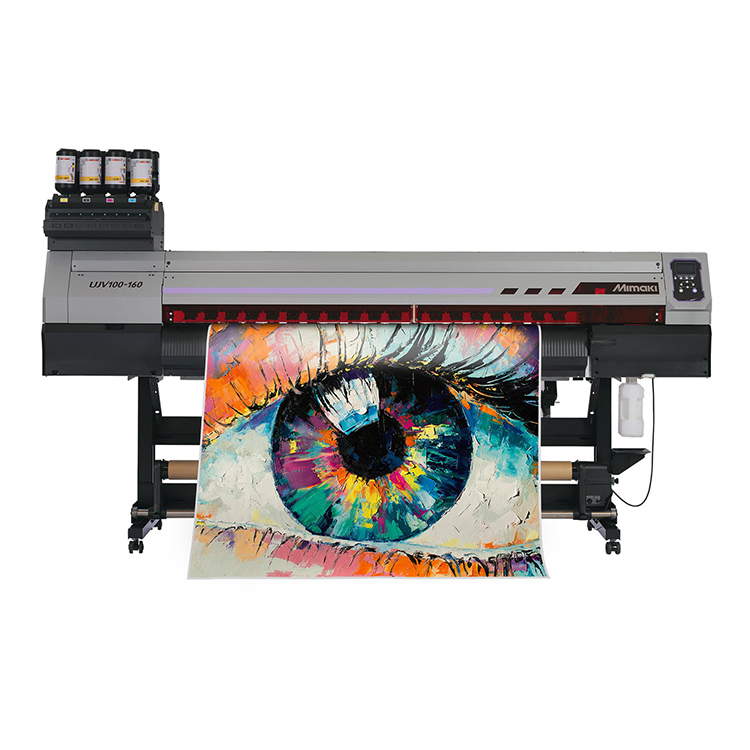
MIMAKI-UJV100-160 Plus Inkjet Printer

เครื่องพิมพ์ UV Roll to Roll รุ่น UJV100-160 Plus

info@tech.co.th
Title : Interested Product
ฉัน : () %0D Email : %0D สนใจ : MIMAKI-UJV100-160 Plus (10) %0D link : https://tech.co.th/main/product_detail?product_id=10 %0D รายละเอียดเพิ่มเติม : %0D %0D %0D

Product Detail

UJV100-160Plus


Features

Three additional functions

1. Ink saving function to reduce running costs

Reduces ink consumption by up to 50% while maintaining the color balance of the printed design. Ink reduction levels can be set with simple operations of print software “RasterLink7”, so there is no need for specialized knowledge or equipment for color adjustment.

Fig.1 Image of difference in density for each level setting of the ink saving function

2. Maximum 3-layer printing function to expand the range of applications

The “pull-back printing function”, which pulls back the printed substrate for follow-up printing, supports up to three-layer printing.
Conventional printers support up to two-layers printing, but it was necessary to determine whether to print white to colors or colors to white when the printer was installed.
The UJV100-160Plus has a newly added pull-back printing function that enables printing of both methods regardless of the ink color array. In addition, three-layer printing as shown ink (1) and (2) below provides printing application and added value.

(1) Colors - White - Colors: Applied to brightly colored backlit signage day and night

Fig.2:Visibility by daylight Fig.3:Visibility by backlight

(2) White - Colors - Clear: Applied to window graphics with a variety of expressions

Fig.4 Window graphic image with white/Color/Clear print

3. Seamless linkage with Mimaki’s cutting plotter improves work efficiency

Conventional labels and stockers are produced by printing on a substrate and then using our cutting software ”Finecut9”. And output the cut data. Now, it is possible to output cut data directly from “RasterLink7” to Mimaki cutting plotter “CG-AR series”, improving the work efficiency of operators in cutting operations. This enables linking of printing and cutting even if the output PC does not have design software.

Fig.5 Connection diagram of RasterLink7 and CG-AR

Support functions that enables anyone to print stable, high image quality (Same functions as previous models)

Automatic dot position and feed correction function:DAS (Dot Adjustment System)

When media or printing conditions are changed, an adjustment of ink dot position and media feed amount to suit is necessary.
As the DAS automatically performs these operations, printing can be performed without any labor or variations in adjustments by the operator.

DAS (Dot Adjustment System)

Smooth printing by reducing color irregularities and glossy streaks:MAPS4 (Mimaki Advanced Pass System 4)

Generally, swath boundaries are straight lines. Therefore, a slight misalignment between boundaries causes banding or uneven color printing. MAPS4 (Mimaki Advanced Pass System 4) reduces banding and uneven color printing with blurred boundaries similar to gradation printing.

MAPS ON

MAPS ON
Banding and uneven color printing are reduced by scattering swath boundaries. Beautiful print image is obtained.


MAPS OFF

MAPS OFF
Bandings appear on swath boundaries. Print quality is remarkably degraded because banding is recognizable on each boundary.

NCU & NRS automatically detects missing nozzles and performs recovery

NCU (Nozzle Check Unit) detects the status of nozzles automatically. When the NCU detects a missing nozzle, it automatically performs cleaning. If cleaning does not solve the problem, NRS (Nozzle Recovery System) automatically replaces the defective nozzles with other nozzles, which enables users to continue the print operations without waiting for a repair by a technician.

NCU & NRS

Specification

Specifications

UJV100-160Plus
Print headOn-demand piezo head (2 staggered layout)
Print resolution360 dpi, 720 dpi, 900 dpi, 1200 dpi
InkType/ ColorUV-curable ink LUS-170 (C, M, Y, K, W, Cl)
UV-curable ink LUS-190 (C, M, Y, K, W, Cl)
UV-curable ink LUS-210 (C, M, Y, K, W, Cl)
*Availability varies depending on the regions
Capacity1L bottle
Maximum print width1,610 mm (63.4 in)
MediaMaximum width1,620 mm (63.8 in)
Thickness1.0 mm or lower
Roll diameterφ250 mm or less
Roll weight45 kg or less
Roll inside diameter2 inch / 3 inch
CertificationsVCCI class A, FCC class A, ETL IEC 62368-1,
CE Marking (EMC, Low voltage, Machinery directive, and RoHS),
CB, REACH, ENERGY STAR®, EAC, RCM
InterfaceUSB2.0 Hi-Speed, Ethernet 1000 BASE-T
Power supplySingle-phase AC100-120V±10%/12A, AC200-240V±10%/8A, 50/60Hz±1Hz
Power consumptionMaximum 500W (operating), 4.5W (sleep)
Operational environmentTemperature: 20–30 °C (68–86 °F)
Humidity: 35–65% Rh (Non condensing)
Dimensions (W×D×H)2,775 x 700 x 1,475 mm (109.3 x 27.6 x 58.1 in)
Weight167 kg (368.2 lb)

Ink set

LUS-170
[C,M,Y,K,W,Cl]
C M Y K
C M Y K W
C M Y K W Cl
LUS-210
[C,M,Y,K,W,Cl]
C M Y K
C M Y K W
C M Y K W Cl
  • Some of the screens and printing samples in this website are artificial renderings.
  • Specifications are subject to change without notice.
  • All trademarks or registered trademarks are the property of their respective owners.
  • Inkjet printers print using extremely fine dots, thus colors may vary slightly following replacement of the printing heads. Also note that if using multiple printer units, colors may vary slightly among the units due to slight individual differences among the units.

Precautions for UV printing

 Inks and substrates:

  • Please note that properties and adhesion, weather resistance etc. of ink and substrates can vary. Therefore please test materials before printing.
  • Some substrates require primer before printing. Please test materials beforehand or ask your sales representative.

 Safety notice:
You are dealing with UV light sources that may harm your health. Please follow below guidelines strictly:

  • Do not look directly into the UV light source nor place your hand, or expose your skin directly to the UV light source.
  • Depending upon print mode, there might occur some VOC emittance from printed parts not yet cured and hardened.
  • In addition, please read the instructions and guidelines of the manual carefully and follow those.

Support